![200707 pencil-logo-white-green-white_background-square.png]](https://support.pencilpay.com/hs-fs/hubfs/200707%20pencil-logo-white-green-white_background-square.png?width=150&height=53&name=200707%20pencil-logo-white-green-white_background-square.png)
If you are already logged in to Pencil, you can use this link to go to your default settings for Invoices & Collections in Pencil.
https://app.pencilpay.com/admin/invoices_collections
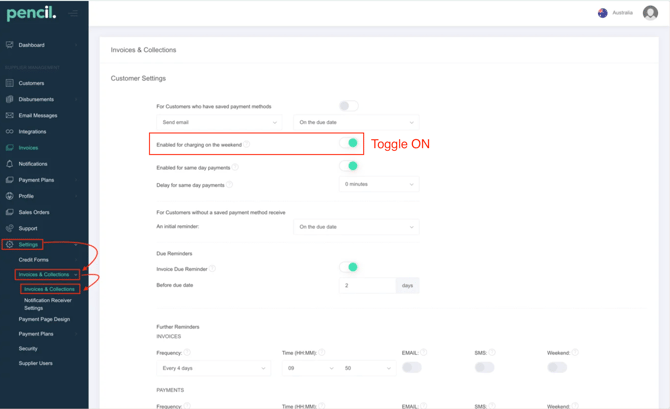
In Pencil → Go to Settings → Invoices & Collections → Invoices & Collections → toggle OFF "For Customers who have saved payment methods" and then scroll down and Save.
Related Support Articles:
Troubleshooting
-
My customer’s invoice didn’t auto-charge on the Due date as scheduled
-
Auto-charge didn't charge on a weekend (Enabled for charging on the weekend setting) in Pencil
- What to do when Customer Pays Invoice Externally but is on Auto-charge
Disable Auto-charge
Need Help?
If you have any questions or need further assistance Reply directly in your support inbox or contact PencilPay Support for detailed guidance or you can book a Zoom meeting with Pencil Support in the calendar below for personalized help.