![200707 pencil-logo-white-green-white_background-square.png]](https://support.pencilpay.com/hs-fs/hubfs/200707%20pencil-logo-white-green-white_background-square.png?width=150&height=53&name=200707%20pencil-logo-white-green-white_background-square.png)
Please follow the steps below toupdate the default payment method of a payment term in Pencil:
- Log into https://app.pencilpay.com/
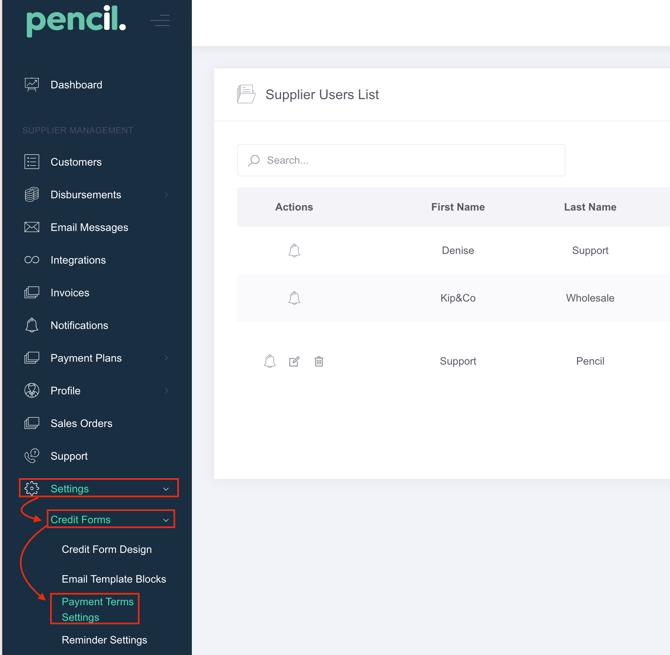
- Go to: Settings -> Credit Forms -> Payment Terms Settings.
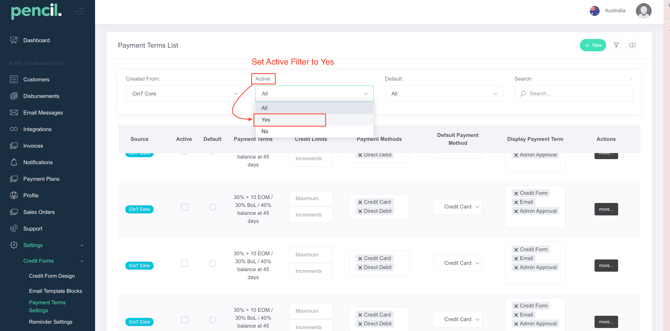
- Check that you filtered by Active = Yes.
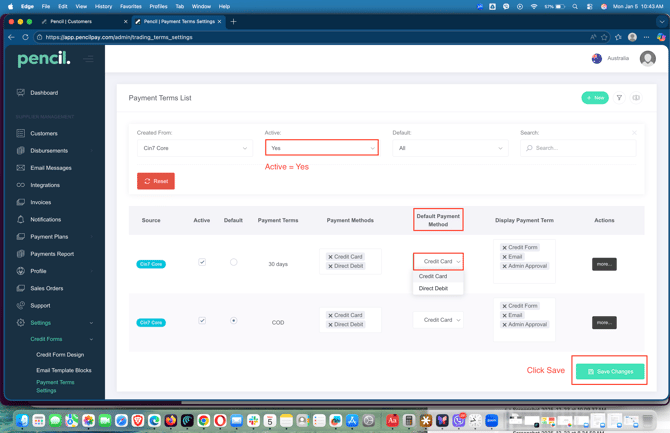
- Then find each active trading term and you will find the Column for Default Payment Method of each Active Payment Term.
- Select the Default Payment Method for each of the Active Payment Terms and hit Save Changes.
Need Help?
If you have any questions or need further assistance, you can book a Zoom meeting with Pencil Support in the calendar below for personalized help. Our team is available to ensure your payment syncing and automation remain seamless.