![200707 pencil-logo-white-green-white_background-square.png]](https://support.pencilpay.com/hs-fs/hubfs/200707%20pencil-logo-white-green-white_background-square.png?width=150&height=53&name=200707%20pencil-logo-white-green-white_background-square.png)
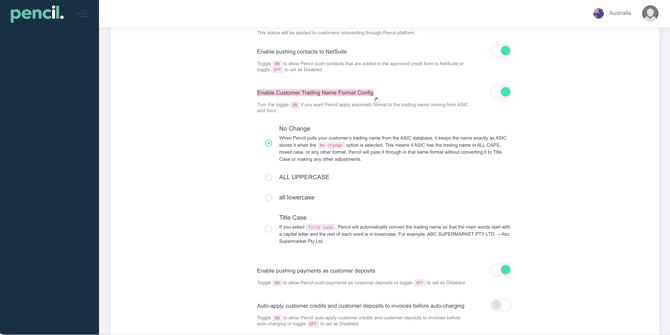
The Customer Trading Name Format Config allows you to choose how Pencil stores and displays trading names that are pulled automatically from ASIC to Pencil and have control on the format when the Trading Name syncs to Xero. When enabled, Pencil can standardise the casing of trading names instead of using the raw format from ASIC.
How to enable the setting
-
Go to you Pencil and log in as a Supplier User → Click on Integrations → Click on the Xero tile → Scroll down and locate the "Enable Customer Trading Name Format Config" Setting
-
Turn the toggle Enable Customer Trading Name Format Config to ON to allow Pencil to apply automatic formatting to trading names coming from ASIC to sync to Xero.
-
Once enabled, select your preferred format option for trading names (explained below):
Turn the toggle ON for setting "Enable Customer Trading Name Format Config" if you want Pencil apply automatic format to the trading name coming from ASIC to Xero.
No Change
When Pencil pulls your customer’s trading name from the ASIC database, it keeps the name exactly as ASIC stores it when the No change option is selected. This means if ASIC has the trading name in ALL CAPS, mixed case, or any other format, Pencil will pass it through in that same format without converting it to Title Case or making any other adjustments.
ALL UPPERCASE
When you select ALL UPPERCASE, Pencil converts every letter in the trading name to capital letters. Use this if you want all customer trading names to appear in a consistent, all-caps style on documents and inside Xero.
all lowercase
When you select all lowercase, Pencil converts every letter in the trading name to lowercase. Use this if your internal naming standard prefers everything in lowercase for search or matching purposes..
Title Case
If you select Title Case, Pencil will automatically convert the trading name so that the main words start with a capital letter and the rest of each word is in lowercase.
For example: ABC SUPERMARKET PTY LTD → Abc Supermarket Pty Ltd.