![200707 pencil-logo-white-green-white_background-square.png]](https://support.pencilpay.com/hs-fs/hubfs/200707%20pencil-logo-white-green-white_background-square.png?width=150&height=53&name=200707%20pencil-logo-white-green-white_background-square.png)
To re-sync payment from Pencil to your MYOB Acumatica, follow the steps here:
-
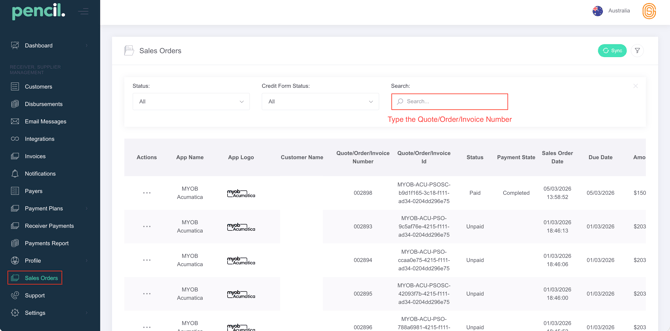
Go to Sales Orders -> Search for your Sale Order number.
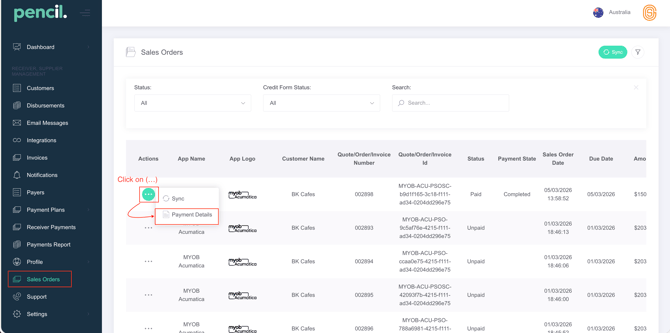
2. Click on the (...) More Actions -> Click on Payment Details -> Then click on the Re-sync Button.
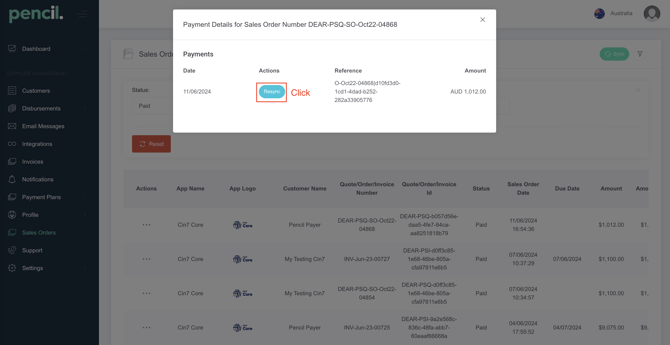
Popup will look like this. Click Resync Button.
3. Wait 10-30 seconds and go back to see if the payment has been applied to the Sales Order number or is showing as a Customer Credit.