![200707 pencil-logo-white-green-white_background-square.png]](https://support.pencilpay.com/hs-fs/hubfs/200707%20pencil-logo-white-green-white_background-square.png?width=150&height=53&name=200707%20pencil-logo-white-green-white_background-square.png)
Cause
Pencil's contact sync behavior depends on the Sync Contacts Options setting in Xero integration settings. When this is set to Customers only, Pencil will only sync Xero contacts that have at least one invoice assigned to them.
If a contact has no invoices yet, it is treated as a non-customer and is excluded from the sync — even if the contact exists in Xero.
In this case, if a newly created Xero customer contact has no invoice assigned to it in Xero, and the Sync Contacts Options setting is currently set to Customers only, so Pencil correctly skips syncing this contact.
Resolution
To sync a contact that doesn't yet have an invoice:
- Go to Xero Integration Settings in Pencil.
- Change the Sync Contacts Options setting from Customers only to All contacts excluding suppliers.
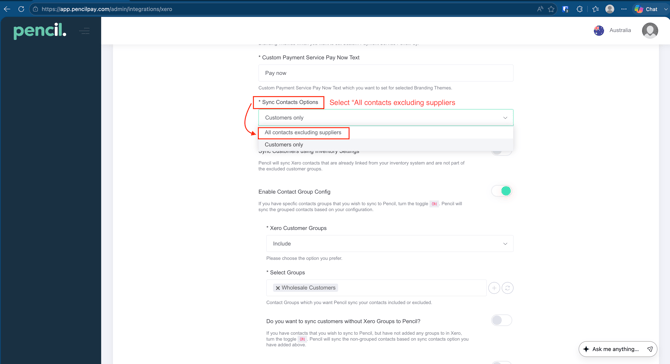
- Save the setting change.
- Manually trigger a sync for the Xero contact (make sure it is the exact customer name in Xero) again.
The contact should now appear in Pencil, since the setting no longer requires an invoice to exist before syncing.
Alternatively, you can create an invoice for the customer and void the invoice. This will trigger syncing the customer and invoice (voiding the invoice at the same time).