![200707 pencil-logo-white-green-white_background-square.png]](https://support.pencilpay.com/hs-fs/hubfs/200707%20pencil-logo-white-green-white_background-square.png?width=150&height=53&name=200707%20pencil-logo-white-green-white_background-square.png)
Steps to follow:
- Try clearing the search and toggling Show spent items as well as received.
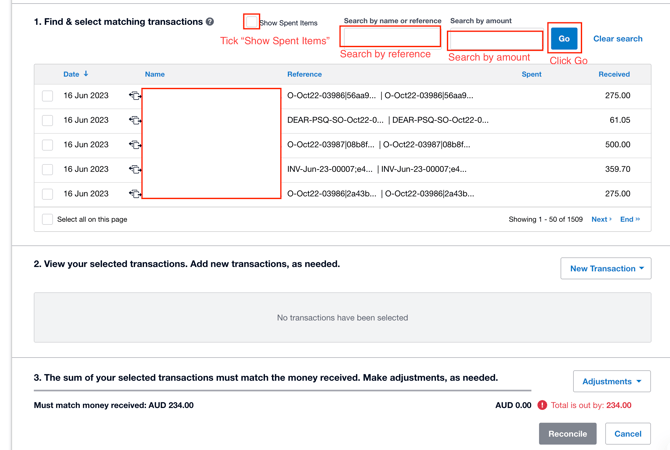
- Double-check the date/year filter — it's easy to be a page off and land in the wrong year/month.
- Try searching by the last few digits of the invoice/reference number instead of amount.
- If it's still not appearing, the disbursement may not have synced from Pencil into Xero at all:
- In Pencil Admin, go to Disbursements, find the transaction, and Under Actions, click Resync button
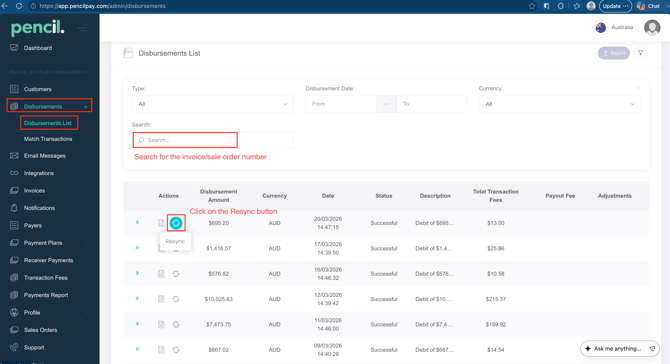
- Go back to Xero, refresh, and re-check Reconcile / Find & Match.
- In Pencil Admin, go to Disbursements, find the transaction, and Under Actions, click Resync button
- Xero Reconciliation Troubleshooting Guide Overview
- Why Did My Transactions Stop Auto-Reconciling in Xero
- What do do when the Auto-Reconciliation has stopped working in Xero
- How to Undo an Incorrect Reconciliation | Using the Remove and Redo Feature in Xero
Need Help?
If you have any questions or need further assistance, you can book a Zoom meeting with Pencil Support in the calendar below for personalized help. Our team is available to ensure your payment syncing and automation remain seamless.